
AI-assisted content notice: This documentation was created with support from artificial intelligence and has been reviewed by humans for accuracy.
Updating PHP (EL only)
Enterprise Linux users only
This documentation describes the update process of the used PHP version. This documentation is only relevant for users of Enterprise Linux distributions (RHEL, AlmaLinux, Rocky Linux, Oracle Linux). Debian and Ubuntu has a recent PHP version in their repositories. Updating the PHP version on Debian or Ubuntu is not supported and will not be covered in this documentation.
Supported distributions
This documentation covers the following Enterprise Linux versions:
- RHEL 8
- RHEL 9
- RHEL 10
Using Debian or Ubuntu?
If you are using Debian or Ubuntu, you have to upgrade to the next major version of your distribution to get a supported php version. Please follow our upgrade documentation to do so. Changing the PHP version through third party repositories is not supported and will break the system.
Which PHP version is my system using?
To see which PHP version is currently installed on your system, you can navigate to System tools → Debugging.
openITCOCKPIT will display the current PHP version in the Server information section.
openITCOCKPIT will also display a warning if the PHP version is too old and needs to be updated.
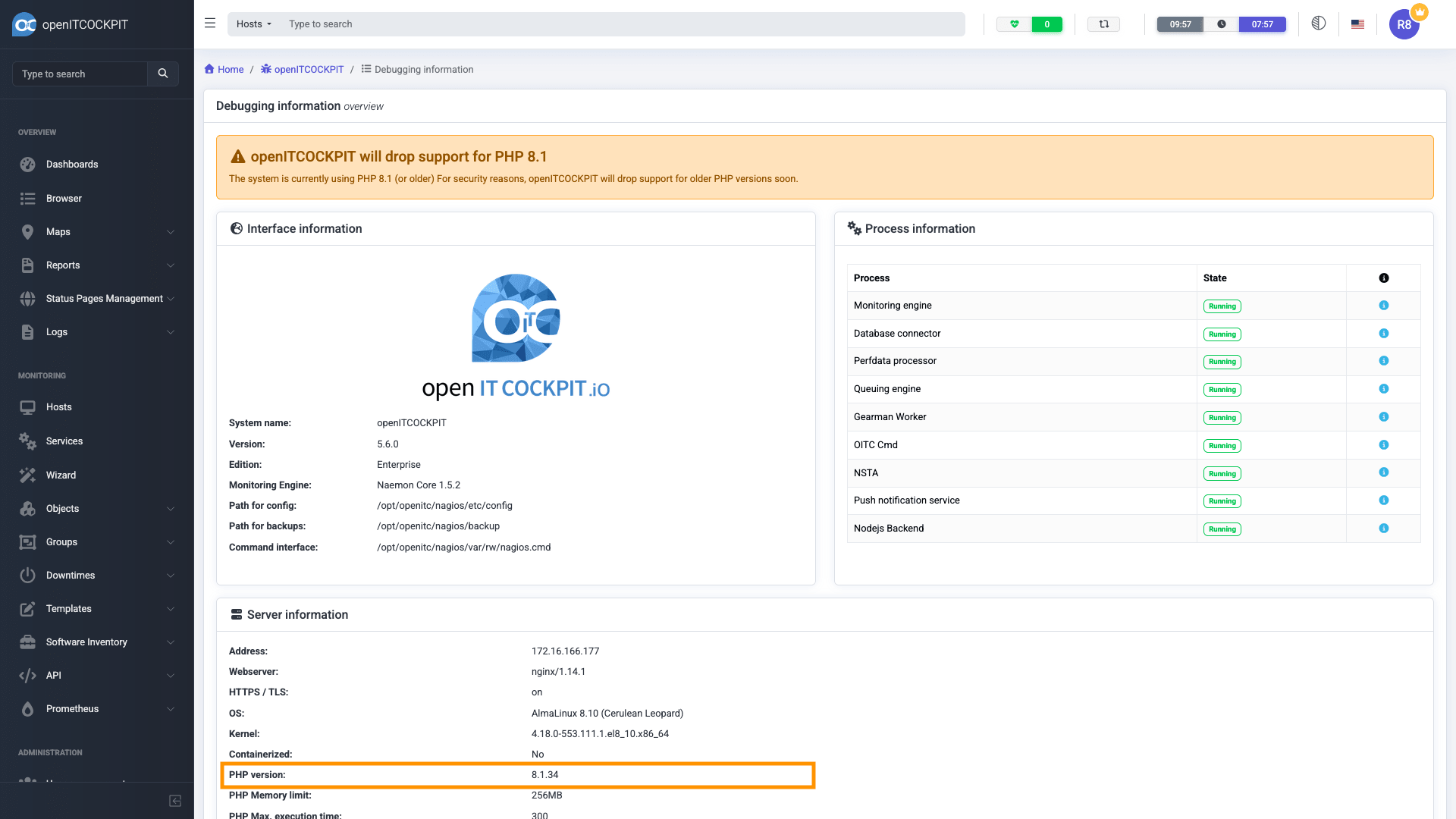
You should also ensure that the openITCOCKPIT interface and CLI is using the same PHP version. You can check this by running the following command:
php -v
It should display the same version as in the openITCOCKPIT interface. For example:
[root@oitc-rhel8 ~]# php -v
PHP 8.1.34 (cli) (built: May  7 2026 07:54:01) (NTS gcc x86_64)
Copyright (c) The PHP Group
Zend Engine v4.1.34, Copyright (c) Zend Technologies
    with Zend OPcache v8.1.34, Copyright (c), by Zend Technologies
Why updating PHP is important
openITCOCKPIT requires a minimum PHP version to ensure compatibility and security. Running an outdated PHP version may lead to unexpected behavior, security vulnerabilities, and lack of support for new features. The PHP Team is providing a overview about currently supported PHP versions on their supported versions page.
Updating PHP
openITCOCKPIT requires PHP in version 8.3 or newer.
Due to the amount of support complexity with Enterprise Linux systems, only the openITCOCKPIT Enterprise Edition is avaiable for Red Hat Enterprise Linux and RHEL based distributions such as: Rocky Linux, AlmaLinux, or Oracle Linux.
Please get in touch with us if you need assistants upgrading your installation of openITCOCKPIT.
Before you start, make sure you have installed the latest updates for your system:
dnf --refresh check-update

dnf update
This document assumes that you have installed PHP from Remi's RPM repository.
To upgrade your PHP version, please run the following command:
dnf module switch-to php:remi-8.3
This will switch your system to the latest version of PHP 8.3
Important
If you are using a openITCOCKPIT version older than 5.7.0, you need to create the following directories and symbolic links manually. Later versions of openITCOCKPIT will create these directories and symbolic links automatically.
mkdir -p "/etc/php/8.3/fpm"
ln -s /etc/php-fpm.conf "/etc/php/8.3/fpm/php-fpm.conf"
ln -s /etc/php.d "/etc/php/8.3/fpm/conf.d"
ln -s /etc/php-fpm.d "/etc/php/8.3/fpm/pool.d"
To finish the upgrade, please run the following command:
openitcockpit-update
On openITCOCKPIT Satellite Systems you need to run the command:
/opt/openitc/frontend/UPDATE.sh
It is also recommended to reboot the system.
reboot
Verifying the PHP version
After the system has rebooted, you can verify the PHP version by navigating to System tools → Debugging in the openITCOCKPIT interface. The current PHP version should now be displayed as 8.3 or newer.
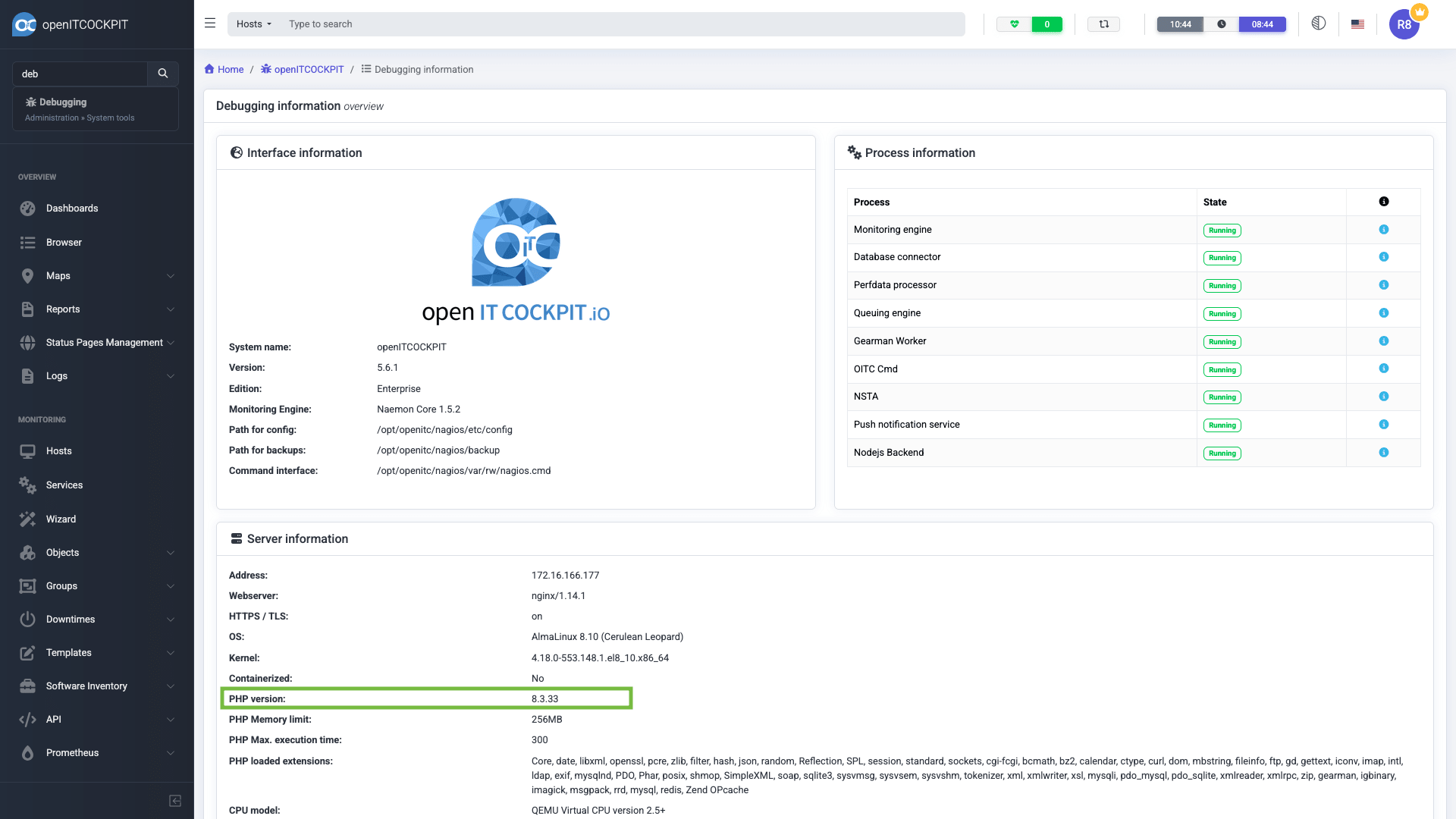
Please also verify that the openITCOCKPIT interface and CLI are using the same PHP version.
[root@oitc-rhel8 ~]# php -v
PHP 8.3.33 (cli) (built: Jul 28 2026 17:56:10) (NTS gcc x86_64)
Copyright (c) The PHP Group
Zend Engine v4.3.33, Copyright (c) Zend Technologies
    with Zend OPcache v8.3.33, Copyright (c), by Zend Technologies