CakePHP Back-End
Das Modul backen
Bevor Sie beginnen, stellen Sie sicher, dass Sie sich im Verzeichnis /opt/openitc/frontend befinden und einen neuen Git-Branch fuer Ihre Entwicklungsarbeit erstellt haben.
cd /opt/openitc/frontend
git checkout -b example_module

openITCOCKPIT stellt mit oitc ein eigenes CLI-Tool bereit, das ein "Skelett" für ein neues Modul erzeugen kann. Dieser Prozess wird Baking genannt und basiert auf dem CakePHP-Befehl bake.
Um ein neues Modul zu erstellen, führen Sie den folgenden Befehl aus:
oitc bake plugin ExampleModule
Hinweis
Der Modulname muss auf Module enden. Beispiele: ExampleModule, AutoreportsModule, MkModule usw.
Das System fordert Sie auf, das Plugin-Verzeichnis zu bestätigen:
Plugin Directory: /opt/openitc/frontend/plugins/ExampleModule
Bestätigen Sie mit y.
Als Nächstes werden Sie gefragt, ob Sie die folgende Datei überschreiben möchten:
/opt/openitc/frontend/composer.json
Überschreiben Sie diese Datei nicht. Geben Sie n ein, um diesen Schritt zu überspringen.
Beispielausgabe des Bake-Befehls:
root @ /opt/openitc/frontend - [ExampleModule] # oitc bake plugin ExampleModule
Plugin Name: ExampleModule
Plugin Directory: /opt/openitc/frontend/plugins/ExampleModule
-------------------------------------------------------------------------------
Look okay? (y/n/q)
[y] > y
Generating .gitignore file...

Creating file /opt/openitc/frontend/plugins/ExampleModule/.gitignore
Wrote `/opt/openitc/frontend/plugins/ExampleModule/.gitignore`
Generating README.md file...

Creating file /opt/openitc/frontend/plugins/ExampleModule/README.md
Wrote `/opt/openitc/frontend/plugins/ExampleModule/README.md`
Generating composer.json file...

Creating file /opt/openitc/frontend/plugins/ExampleModule/composer.json
Wrote `/opt/openitc/frontend/plugins/ExampleModule/composer.json`
Generating phpunit.xml.dist file...

Creating file /opt/openitc/frontend/plugins/ExampleModule/phpunit.xml.dist
Wrote `/opt/openitc/frontend/plugins/ExampleModule/phpunit.xml.dist`
Generating src/Controller/AppController.php file...

Creating file /opt/openitc/frontend/plugins/ExampleModule/src/Controller/AppController.php
Wrote `/opt/openitc/frontend/plugins/ExampleModule/src/Controller/AppController.php`
Generating src/Plugin.php file...

Creating file /opt/openitc/frontend/plugins/ExampleModule/src/Plugin.php
Wrote `/opt/openitc/frontend/plugins/ExampleModule/src/Plugin.php`
Generating tests/bootstrap.php file...

Creating file /opt/openitc/frontend/plugins/ExampleModule/tests/bootstrap.php
Wrote `/opt/openitc/frontend/plugins/ExampleModule/tests/bootstrap.php`
Generating webroot/.gitkeep file...

Creating file /opt/openitc/frontend/plugins/ExampleModule/webroot/.gitkeep
Wrote `/opt/openitc/frontend/plugins/ExampleModule/webroot/.gitkeep`
Modifying composer autoloader

File `/opt/openitc/frontend/composer.json` exists
Do you want to overwrite? (y/n/a/q)
[n] > n
Skip `/opt/openitc/frontend/composer.json`

Generating autoload files
Generated autoload files


/opt/openitc/frontend/src/Application.php modified
-------------------------------------------------------------------------------
Created: ExampleModule in /opt/openitc/frontend/plugins/ExampleModule


root @ /opt/openitc/frontend - [ExampleModule] #
Dateiberechtigungen korrigieren
Immer wenn Sie mit dem Befehl oitc Dateien erzeugen, wird empfohlen, die erzeugten Dateien dem Webserver-Benutzer www-data zuzuweisen.
openITCOCKPIT bietet einen integrierten Befehl zum Setzen der korrekten Dateiberechtigungen.
oitc rights

Application.php bereinigen
Öffnen Sie /opt/openitc/frontend/src/Application.php und entfernen Sie die folgende Zeile:
$this->addPlugin('ExampleModule');
openITCOCKPIT lädt alle Module automatisch, daher ist keine manuelle Registrierung erforderlich.
Routing anpassen
Standardmäßig verwendet CakePHP einen Bindestrich (-) als CamelCase-Trennzeichen in URLs. Aus historischen Grüden benötigt openITCOCKPIT jedoch stattdessen einen Unterstrich (_).
Öffnen Sie /opt/openitc/frontend/plugins/ExampleModule/src/Plugin.php und suchen Sie den folgenden Code:
public function routes(RouteBuilder $routes): void
{
    $routes->plugin(
        'ExampleModule',
        ['path' => '/example-module'],
        function (RouteBuilder $builder) {
            // Add custom routes here

            $builder->fallbacks();
        }
    );
    parent::routes($routes);
}
Ändern Sie den path-Wert von example-module zu example_module:
['path' => '/example_module'],
Den Controller backen
oitc bake controller Test -p ExampleModule
Dadurch wird ein neuer Controller erstellt, in dem Sie Ihre API-Aktionen implementieren können.
<?php
// Copyright (C) <2015-present>  <it-novum GmbH>
//
// This file is dual licensed
//
// 1.
//     This program is free software: you can redistribute it and/or modify
//     it under the terms of the GNU General Public License as published by
//     the Free Software Foundation, version 3 of the License.
//
//     This program is distributed in the hope that it will be useful,
//     but WITHOUT ANY WARRANTY; without even the implied warranty of
//     MERCHANTABILITY or FITNESS FOR A PARTICULAR PURPOSE.  See the
//     GNU General Public License for more details.
//
//     You should have received a copy of the GNU General Public License
//     along with this program.  If not, see <http://www.gnu.org/licenses/>.
//
// 2.
//     If you purchased an openITCOCKPIT Enterprise Edition you can use this file
//     under the terms of the openITCOCKPIT Enterprise Edition license agreement.
//     License agreement and license key will be shipped with the order
//     confirmation.

declare(strict_types=1);

namespace ExampleModule\Controller;

use ExampleModule\Model\Table\MypluginSettingsTable;

class TestController extends AppController {
    public function index() {
        // More code to come...
    }
}
Berechtigungen der Rolle "Administrator" zuweisen
Standardmäßig ist der Zugriff auf alle API-Aktionen verweigert.
Um der Rolle Administrator automatisch alle Berechtigungen zuzuweisen, führen Sie aus:
openitcockpit-update --no-system-files
Wenn Ihr aktueller Benutzer nicht Teil der Rolle Administrator ist, navigieren Sie zu:
Administration -> User Management -> Manage User Roles
und weisen Sie die erforderlichen Berechtigungen manuell zu.
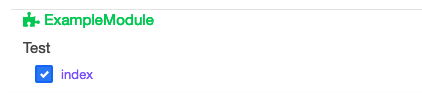
AclDependencies
Standardmäßig erstellt jede Controller-Aktion ihre eigene Benutzerberechtigung.
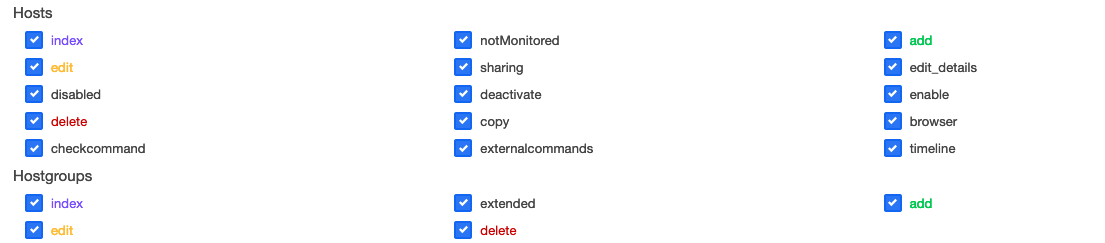
Einige Aktionen hängen von anderen Aktionen ab, und das Deaktivieren einer bestimmten Berechtigung kann die Funktionalität der gesamten Anwendung beeinträchtigen.
Um das zu verhindern, können Sie ACL-Abhängigkeiten definieren.
ACL-Abhängigkeiten werden in folgender Datei konfiguriert:
/opt/openitc/frontend/plugins/ExampleModule/src/Lib/AclDependencies.php
<?php
namespace ExampleModule\Lib;

use App\Lib\PluginAclDependencies;

class AclDependencies extends PluginAclDependencies {

    public function __construct() {
        parent::__construct();

        // Add actions that should always be allowed.
        $this
            //      Controller name, Action mame
            ->allow('Test', 'foobar');

        ///////////////////////////////
        //    Add dependencies       //
        //////////////////////////////

        $this
            //           Controller name, Action name, depends on: Controller name, Action name
            ->dependency('Test', 'foo', 'Test', 'bar');
    }
}
Aktionen, die als immer erlaubt markiert oder als Abhängigkeiten definiert sind, können für Benutzerrollen nicht mehr einzeln konfiguriert werden. Diese Berechtigungen werden automatisch vom System verwaltet.
Immer wenn Sie AclDependencies ändern, führen Sie aus:
openitcockpit-update --no-system-files
Menüeinträge
Standardmäßig ist das openITCOCKPIT-Menü in vier Kategorien unterteilt (MenuHeadline):
- Übersicht
- Monitoring
- Administration
- Systemkonfiguration
Sie können entweder Menüeinträge zu diesen Kategorien hinzufügen oder eine eigene benutzerdefinierte Kategorie erstellen.
Alle Menüdefinitionen für Ihr Modul befinden sich in:
/opt/openitc/frontend/plugins/ExampleModule/src/Lib/Menu.php
Einen Menüeintrag zu einer vorhandenen Überschrift hinzufügen
PHP-Code
<?php

namespace ExampleModule\Lib;


use itnovum\openITCOCKPIT\Core\Menu\MenuCategory;
use itnovum\openITCOCKPIT\Core\Menu\MenuHeadline;
use itnovum\openITCOCKPIT\Core\Menu\MenuInterface;
use itnovum\openITCOCKPIT\Core\Menu\MenuLink;

class Menu implements MenuInterface {

    /**
     * @return array
     */
    public function getHeadlines() {
        $Overview = new MenuHeadline(\itnovum\openITCOCKPIT\Core\Menu\Menu::MENU_OVERVIEW);
        $Overview
            //Create a new Sub-Category of the Overview Headline
            ->addCategory((new MenuCategory(
                'ExampleModule',
                __('Example Module'),
                1000,
                ['fas', 'burn']
            ))
                //Add new Link to Sub-Category
                ->addLink(new MenuLink(
                    __('Hello world'),
                    'TestIndex', // Name of the NG-State, historically needed but may be deprecated in the future
                    'Test', // Name of the PHP Controller
                    'index', // Name of the PHP action
                    'ExampleModule', //Name of the Module
                    ['fas', 'code'], //Menu Icon
                    [],
                    1,
                    true,
                    'example_module/index' //URL to the action
                ))
            );

        return [$Overview];
    }

}
Ergebnis
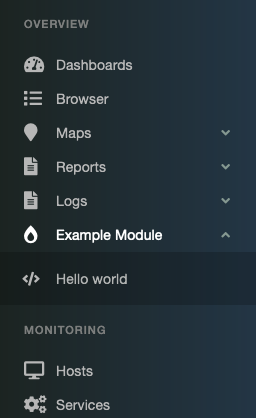
Führen Sie den folgenden Befehl aus, um das Menü zu aktualisieren:
openitcockpit-update --no-system-files
Menüeinträge unter einer neuen Überschrift erstellen
Bei Bedarf können Sie auch eigene Menüüberschriften erstellen.
PHP-Code
<?php

namespace ExampleModule\Lib;


use itnovum\openITCOCKPIT\Core\Menu\MenuCategory;
use itnovum\openITCOCKPIT\Core\Menu\MenuHeadline;
use itnovum\openITCOCKPIT\Core\Menu\MenuInterface;
use itnovum\openITCOCKPIT\Core\Menu\MenuLink;

class Menu implements MenuInterface {

    /**
     * @return array
     */
    public function getHeadlines() {
        $ExampleModuleHeadline = new MenuHeadline(
            'ExampleModuleHeadline',
            __('Example Module')
        );
        $ExampleModuleHeadline
            //Create a new Sub-Category of the Overview Headline
            ->addCategory((new MenuCategory(
                'ExampleModule',
                __('Example Module'),
                1000,
                'fas burn'
            ))
                //Add new Link to Sub-Category
                ->addLink(new MenuLink(
                    __('Hello world'),
                    'TestIndex', // Name of the NG-State, historically needed but may be deprecated in the future
                    'Test', //Name of the PHP Controller
                    'index', //Name of the PHP action
                    'ExampleModule', //Name of the Module
                    ['fas', 'code'], //Menu Icon
                    [],
                    1,
                    true,
                    'example_module/index' //URL to the action
                ))
            );

        return [$ExampleModuleHeadline];
    }
}
Ergebnis
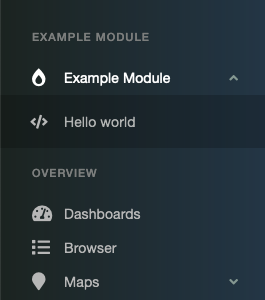
Führen Sie den folgenden Befehl aus, um das Menü zu aktualisieren:
openitcockpit-update --no-system-files
Datenbankzugriff
Eine Migration erstellen
Migrationen werden verwendet, um Ihr Datenbankschema zu ändern. Sie ermöglichen es Ihnen, Tabellen oder Spalten zu erstellen, zu ändern und zu entfernen, ohne SQL manuell zu schreiben.
oitc migrations create -p ExampleModule Initial
Dadurch wird eine neue, leere Migrationsdatei erstellt unter:
/opt/openitc/frontend/plugins/ExampleModule/config/Migrations/<timestamp>_Initial.php
Beispielmigration:
<?php
// Copyright (C) <2015-present>  <it-novum GmbH>
//
// This file is dual licensed
//
// 1.
//     This program is free software: you can redistribute it and/or modify
//     it under the terms of the GNU General Public License as published by
//     the Free Software Foundation, version 3 of the License.
//
//     This program is distributed in the hope that it will be useful,
//     but WITHOUT ANY WARRANTY; without even the implied warranty of
//     MERCHANTABILITY or FITNESS FOR A PARTICULAR PURPOSE.  See the
//     GNU General Public License for more details.
//
//     You should have received a copy of the GNU General Public License
//     along with this program.  If not, see <http://www.gnu.org/licenses/>.
//
// 2.
//     If you purchased an openITCOCKPIT Enterprise Edition you can use this file
//     under the terms of the openITCOCKPIT Enterprise Edition license agreement.
//     License agreement and license key will be shipped with the order
//     confirmation.

declare(strict_types=1);

use Migrations\AbstractMigration;

class Initial extends AbstractMigration {

    /**
     * Change Method.
     *
     * More information on this method is available here:
     * https://book.cakephp.org/phinx/0/en/migrations.html#the-change-method
     * @return void
     */
    public function change(): void {
        $table = $this->table('myplugin_settings');
        $table->addColumn('webhook_url', 'string', [
            'default' => '',
            'limit'   => 255,
            'null'    => false,
        ]);
        $table->addColumn('created', 'datetime', [
            'default' => null,
            'null'    => false,
        ]);
        $table->addColumn('modified', 'datetime', [
            'default' => null,
            'null'    => false,
        ]);
        $table->create();
    }
}
Die Migration ausführen
Das Erstellen einer Migration ist nur der erste Schritt. Um sie anzuwenden, führen Sie aus:
oitc migrations migrate -p ExampleModule
Sie können die neue Tabelle über die MySQL-CLI oder phpMyAdmin prüfen.
Zusätzlich wird ein Eintrag in der Tabelle phinxlog angelegt, damit die Migration nicht erneut ausgeführt wird.
Modelle erstellen
Nachdem die Datenbanktabelle vorhanden ist, können Sie nun die entsprechenden Modellklassen erzeugen.
CakePHPs ORM übernimmt das Erstellen, Lesen, Aktualisieren und Löschen von Datensätzen, daher müssen Sie SQL nicht manuell schreiben.
Erzeugen Sie die Objekte Table und Entity:
oitc bake model -p ExampleModule MypluginSettings
Dieser Befehl erstellt sowohl Entity- als auch Table-Objekte in:
-
plugins/ExampleModule/src/Model/Entity<?php // Copyright (C) <2015-present> <it-novum GmbH> // // This file is dual licensed // // 1. // This program is free software: you can redistribute it and/or modify // it under the terms of the GNU General Public License as published by // the Free Software Foundation, version 3 of the License. // // This program is distributed in the hope that it will be useful, // but WITHOUT ANY WARRANTY; without even the implied warranty of // MERCHANTABILITY or FITNESS FOR A PARTICULAR PURPOSE. See the // GNU General Public License for more details. // // You should have received a copy of the GNU General Public License // along with this program. If not, see <http://www.gnu.org/licenses/>. // // 2. // If you purchased an openITCOCKPIT Enterprise Edition you can use this file // under the terms of the openITCOCKPIT Enterprise Edition license agreement. // License agreement and license key will be shipped with the order // confirmation. declare(strict_types=1); namespace ExampleModule\Model\Entity; use Cake\ORM\Entity; /** * MypluginSetting Entity * * @property int $id * @property string $webhook_url * @property \Cake\I18n\FrozenTime $created * @property \Cake\I18n\FrozenTime $modified */ class MypluginSetting extends Entity { /** * Fields that can be mass assigned using newEntity() or patchEntity(). * * Note that when '*' is set to true, this allows all unspecified fields to * be mass assigned. For security purposes, it is advised to set '*' to false * (or remove it), and explicitly make individual fields accessible as needed. * * @var array<string, bool> */ protected $_accessible = [ 'webhook_url' => true, 'created' => true, 'modified' => true, ]; } -
plugins/ExampleModule/src/Model/Table<?php // Copyright (C) <2015-present> <it-novum GmbH> // // This file is dual licensed // // 1. // This program is free software: you can redistribute it and/or modify // it under the terms of the GNU General Public License as published by // the Free Software Foundation, version 3 of the License. // // This program is distributed in the hope that it will be useful, // but WITHOUT ANY WARRANTY; without even the implied warranty of // MERCHANTABILITY or FITNESS FOR A PARTICULAR PURPOSE. See the // GNU General Public License for more details. // // You should have received a copy of the GNU General Public License // along with this program. If not, see <http://www.gnu.org/licenses/>. // // 2. // If you purchased an openITCOCKPIT Enterprise Edition you can use this file // under the terms of the openITCOCKPIT Enterprise Edition license agreement. // License agreement and license key will be shipped with the order // confirmation. declare(strict_types=1); namespace ExampleModule\Model\Table; use Cake\ORM\Table; use Cake\Validation\Validator; /** * MypluginSettings Model * * @method \ExampleModule\Model\Entity\MypluginSetting newEmptyEntity() * @method \ExampleModule\Model\Entity\MypluginSetting newEntity(array $data, array $options = []) * @method \ExampleModule\Model\Entity\MypluginSetting[] newEntities(array $data, array $options = []) * @method \ExampleModule\Model\Entity\MypluginSetting get($primaryKey, $options = []) * @method \ExampleModule\Model\Entity\MypluginSetting findOrCreate($search, ?callable $callback = null, $options = []) * @method \ExampleModule\Model\Entity\MypluginSetting patchEntity(\Cake\Datasource\EntityInterface $entity, array $data, array $options = []) * @method \ExampleModule\Model\Entity\MypluginSetting[] patchEntities(iterable $entities, array $data, array $options = []) * @method \ExampleModule\Model\Entity\MypluginSetting|false save(\Cake\Datasource\EntityInterface $entity, $options = []) * @method \ExampleModule\Model\Entity\MypluginSetting saveOrFail(\Cake\Datasource\EntityInterface $entity, $options = []) * @method \ExampleModule\Model\Entity\MypluginSetting[]|\Cake\Datasource\ResultSetInterface|false saveMany(iterable $entities, $options = []) * @method \ExampleModule\Model\Entity\MypluginSetting[]|\Cake\Datasource\ResultSetInterface saveManyOrFail(iterable $entities, $options = []) * @method \ExampleModule\Model\Entity\MypluginSetting[]|\Cake\Datasource\ResultSetInterface|false deleteMany(iterable $entities, $options = []) * @method \ExampleModule\Model\Entity\MypluginSetting[]|\Cake\Datasource\ResultSetInterface deleteManyOrFail(iterable $entities, $options = []) * * @mixin \Cake\ORM\Behavior\TimestampBehavior */ class MypluginSettingsTable extends Table { /** * Initialize method * * @param array $config The configuration for the Table. * @return void */ public function initialize(array $config): void { parent::initialize($config); $this->setTable('myplugin_settings'); $this->setDisplayField('webhook_url'); $this->setPrimaryKey('id'); $this->addBehavior('Timestamp'); } /** * Default validation rules. * * @param \Cake\Validation\Validator $validator Validator instance. * @return \Cake\Validation\Validator */ public function validationDefault(Validator $validator): Validator { $validator ->scalar('webhook_url') ->maxLength('webhook_url', 255) ->notEmptyString('webhook_url'); return $validator; } public function getSettingsEntity() { $result = $this->find() ->where([ 'id' => 1 ]) ->first(); if (empty($result)) { $entity = $this->newEmptyEntity(); $entity->set('id', 1); $entity->setAccess('id', false); return $entity; } $result->setAccess('id', false); return $result; } }
Die Tabelle abfragen
Ihr Controller kann jetzt aus der Einstellungs-Tabelle lesen oder sie aktualisieren.
Beispielimplementierung für TestController:
<?php
// Copyright (C) <2015-present>  <it-novum GmbH>
//
// This file is dual licensed
//
// 1.
//     This program is free software: you can redistribute it and/or modify
//     it under the terms of the GNU General Public License as published by
//     the Free Software Foundation, version 3 of the License.
//
//     This program is distributed in the hope that it will be useful,
//     but WITHOUT ANY WARRANTY; without even the implied warranty of
//     MERCHANTABILITY or FITNESS FOR A PARTICULAR PURPOSE.  See the
//     GNU General Public License for more details.
//
//     You should have received a copy of the GNU General Public License
//     along with this program.  If not, see <http://www.gnu.org/licenses/>.
//
// 2.
//     If you purchased an openITCOCKPIT Enterprise Edition you can use this file
//     under the terms of the openITCOCKPIT Enterprise Edition license agreement.
//     License agreement and license key will be shipped with the order
//     confirmation.

declare(strict_types=1);

namespace ExampleModule\Controller;

use ExampleModule\Model\Table\MypluginSettingsTable;

class TestController extends AppController {
    public function index() {
        /** @var MypluginSettingsTable $myPluginSettingsTable */
        $myPluginSettingsTable = $this->getTableLocator()->get('ExampleModule.MypluginSettings');
        $settingsEntity = $myPluginSettingsTable->getSettingsEntity();

        if ($this->request->is('post')) {
            $settingsEntity = $myPluginSettingsTable->patchEntity($settingsEntity, $this->request->getData(null, []));

            $myPluginSettingsTable->save($settingsEntity);
            if ($settingsEntity->hasErrors()) {
                $this->response = $this->response->withStatus(400);
                $this->set('error', $settingsEntity->getErrors());
                $this->viewBuilder()->setOption('serialize', ['error']);
                return;
            }

            $this->set('teamsSettings', $settingsEntity);
            $this->viewBuilder()->setOption('serialize', [
                'teamsSettings'
            ]);
        }

        $this->set('settings', $settingsEntity);
        $this->viewBuilder()->setOption('serialize', ['settings']);
    }
}
Cronjobs
Cronjobs sind CakePHP commands die das openITCOCKPIT CronjobInterface implementieren.
Warning
Stellen Sie sicher, dass Sie das CronjobInterface implementieren.
src/Command/ExampleCronjobCommand.php
<?php
declare(strict_types=1);

namespace ExampleModule\Command;

use App\Model\Table\ProxiesTable;
use App\Model\Table\SystemsettingsTable;
use Cake\Console\Arguments;
use Cake\Console\Command;
use Cake\Console\ConsoleIo;
use Cake\ORM\TableRegistry;
use itnovum\openITCOCKPIT\Core\Interfaces\CronjobInterface;


/**
 * Class ExampleCronjobCommand
 * @package ExampleModule\Command
 */
class ExampleCronjobCommand extends Command implements CronjobInterface {

    /**
     * @param Arguments $args
     * @param ConsoleIo $io
     */
    public function execute(Arguments $args, ConsoleIo $io) {
        $io->setStyle('green', ['text' => 'green']);
        $io->setStyle('red', ['text' => 'red']);

        $io->out('This is an example', 0);

        $io->out('<green>   Ok</green>');
        $this->processQueue();
        $io->hr();
    }
}